Live chat + AI for every website you run
Live chat and AI customer support. Let AI take the routine ones.
Frosvo is live chat and AI customer support software that brings website chat, email, WhatsApp, and social messages into one shared inbox. An assistant that answers from your own knowledge — and hands the chat to your team the moment it should.
- Free plan, no time limit
- 7-day trial of Plus
- Live in minutes
What is Frosvo?
Frosvo is a live chat and AI customer support platform for website owners and support teams. It combines website conversations, email and connected messaging channels in a shared inbox. Teams can answer together, use knowledge-based AI assistance, and take over conversations when a visitor needs a person.
- Shared inbox
- One team workspace for assigning and answering customer conversations from connected channels.
- AI assistant
- An assistant that uses your approved knowledge to answer routine customer questions.
- Human handover
- A transfer to your team when a customer asks for a person or the assistant needs help.
Product information updated . About Frosvo · Contact the team · Support terminology
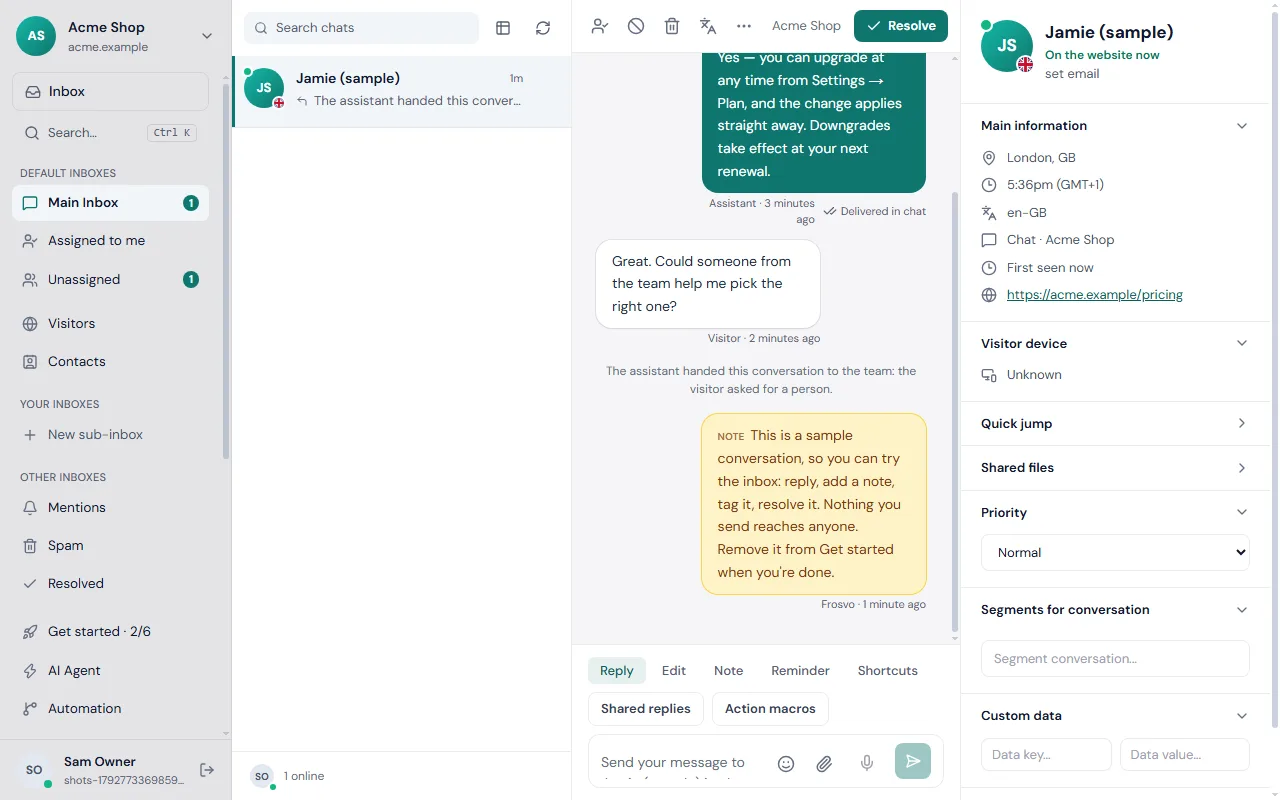
What does the Frosvo inbox look like?
The inbox brings the conversation, customer details and reply tools together. This actual application screenshot shows a sample conversation in a demo workspace, including AI handover and a private note.
AI assistant
An assistant that knows when to step aside
It answers from your help articles and pages, shows its source, and hands over with the reason when it should. Your team gets suggested replies, rewrites and summaries in the composer.
- Answers only from your knowledge
- Hands over on request, uncertainty or rules you set
- See what it resolved, what it cost, and what it couldn't answer
Automation
Put the routine on rails
Workflows send the right chat to the right people, proactive messages greet visitors at the right moment, and SLA deadlines make sure nobody waits too long.
- Visual workflows: when → if → then
- Proactive messages by page, time and visitor
- First-reply deadlines with alerts
Live on your site in three steps
- 1
Add one line
Paste the script before </body> — or use your site builder's custom code box.
<script src="https://…/w.js" data-site="your-site"></script> - 2
Teach the assistant
Write a few articles or add your pages. It answers from them and nothing else.
- 3
Invite your team
Everyone answers from one inbox, on the web or the phone app, with alerts that reach them.
Everything a support team needs
And nothing you have to stitch together yourself.
Contacts and segments
Every person's conversations, pages and fields in one profile. Import, export, segment.
Email campaigns
Send to a segment, with unsubscribe, bounce handling and open and click stats.
Reports and ratings
Response times, workload, satisfaction ratings and what the assistant resolved.
Office hours and SLAs
Away messages out of hours, deadlines on first replies, alerts before they're missed.
Co-browsing
See the visitor's page live, with passwords and card fields masked, when they agree.
Audio and video calls
Start a call from the chat — no download for the visitor.
LiveTranslate
Chat in your language; each visitor reads and writes in theirs.
Privacy built in
Retention rules, data export and erasure on request, per-workspace isolation.
For developers
Fits into the systems you already run
A REST API, signed webhooks and a typed TypeScript client. Show the customer’s account from your own panel, shop or CRM beside every conversation — and let your team act on it, with every action recorded.
// the assistant handed a chat over? page whoever's on call
import { verifyWebhook, parseWebhook } from "./frosvo";

app.post("/frosvo", async (req, res) => {
  const sig = req.headers["frosvo-signature"];
  if (!(await verifyWebhook(req.rawBody, sig, SECRET))) return res.sendStatus(400);
  const event = parseWebhook(req.rawBody);
  if (event.type === "conversation.handed_over") pageOnCall(event.data);
  res.sendStatus(200);
});
Simple pricing, per workspace
Start free. Upgrade when you want the assistant and automation.
Free
$0/mo
Live chat on your website, free for good.
Mini
$35/mo
For a small team getting going.
Essentials
$80/mo
AI that answers from your knowledge base.
Plus
$250/mo
The whole AI suite, and your brand only.
| Plan | Monthly price | Team seats | AI conversations/month |
|---|---|---|---|
| Free | $0 | 2 | Not included |
| Mini | $35 | 4 | About 90 |
| Essentials | $80 | 10 | About 450 |
| Plus | $250 | 20 | About 1,350 |
Frequently asked questions: Live chat & AI customer support
What is Frosvo?
Frosvo is a live chat and AI customer support platform. It puts a chat on your website, brings website chat, email and connected messaging apps into one shared inbox, and adds an AI assistant that answers from your knowledge. Your team can take over when a visitor needs a person.
Does Frosvo work with WordPress, WHMCS and online shops?
Frosvo has installation packages for WordPress and WooCommerce, WHMCS, PrestaShop, Magento and Joomla. For other websites, you can install the widget with one line of script. Choose the integration for your platform, add your site key and check the chat on a public page before launch.
How long does it take to set up?
To install Frosvo, add the widget script or use the installation package for your platform. Then open a public page and send a test message to your inbox. AI assistance needs additional setup: add your help articles or pages, review the answers and configure when conversations should reach your team.
Will the AI make things up?
Frosvo uses the knowledge you provide and can show the source used for an answer. You can configure human handover when the assistant is uncertain, a rule applies or the visitor requests a person. Review the knowledge and test important questions before enabling automated replies; AI answers can still need correction.
Is there really a free plan?
Frosvo has a free plan for the chat widget, shared inbox and available apps, with no time limit. Paid plans add AI assistance and other capabilities according to their limits. You can try Plus for 7 days; a card is needed to start that trial. See pricing for current inclusions.
Can I run several websites from one account?
You can manage several websites from one Frosvo account. Each website has its own widget, branding and assistant name, and your team can filter conversations by site. Check the pricing page before adding websites: the public plans are priced per workspace, and additional websites or workspaces can involve extra charges.
Which currencies can I pay in?
Frosvo supports US dollars, pounds sterling and euros by card or PayPal, plus Saudi riyals and Pakistani rupees by card. Choose the available currency and payment method at checkout. The final total is shown before payment, with tax added where it applies. Contact the team if your required option is unavailable.
Can I connect it to my own systems?
Frosvo provides a REST API, signed webhooks, a typed client and an account connector for integrating your own systems. Your team can view customer account details from a connected panel or shop beside the conversation. Review the developer documentation and the features included in your plan before building an integration.
Your customers are already asking. Be there to answer.
Free to start. Live on your site in minutes.
Support workflows for your kind of team
Plan installation, handover and follow-up around the work your customers need to do.
Hosting providers
Bring hosting sales questions, technical support and incident communication together with Frosvo live chat, AI assistance and account context.
Explore the workflow →SaaS teams
Connect product questions, onboarding and technical follow-up with Frosvo live chat, a shared inbox, AI assistance and mobile chat SDKs.
Explore the workflow →Agencies and support teams
Plan multi-website customer support with Frosvo: site-specific widgets, shared inbox workflows, client workspace boundaries and team handovers.
Explore the workflow →Online stores
Recover abandoned carts at checkout and turn presales questions into store revenue with live chat, AI Copilot, and orders beside every conversation.
Explore the workflow →Clinics, salons and consultancies
Answer visitors' questions in live chat, book appointments through your own booking pages and follow up on WhatsApp and email, all from one shared inbox.
Explore the workflow →Online courses and schools
Answer enrolment, course and login questions in live chat, let an AI assistant answer from your course information, and hand over to your team when it matters.
Explore the workflow →Estate agents and property managers
Answer property enquiries in live chat, route them to the right agent, book viewings and keep WhatsApp and email in one shared inbox for the whole agency.
Explore the workflow →