In short
Frosvo's shared inbox puts website chat, email, WhatsApp, Messenger, Instagram, Telegram, SMS and other channels in one place for your whole team. You assign conversations, write private notes, use saved replies and macros, see who has read each reply, and resolve conversations when they are done.
What you get
- All your channels
- Chat, email, WhatsApp, Messenger, Instagram, Telegram, SMS, Viber, LINE, Discord, X, eBay and Google Play reviews.
- Assign and route
- Round robin, routing rules by site, page or language, and sub-inboxes per team.
- Private notes and mentions
- Talk with teammates inside a conversation; @mention someone to bring them in.
- Saved replies and macros
- Shared answers in a keystroke, and macros that reply, tag and resolve in one go.
- Collision warnings
- See when a teammate is already replying, before two answers go out.
- Reminders
- Set a reminder on a conversation and it comes back to you when it's due.
- Calls and co-browsing
- Start an audio or video call, or see the visitor's page when they agree.
- Desktop and phone app
- Install the desk anywhere, with notifications that reach you.
Get started
Connect channels
Email, WhatsApp, Messenger and the rest under Channels.
Invite your team
Owners and agents; outsourced agents with limited access.
Set the rules
Routing, round robin and response-time targets under Automation.
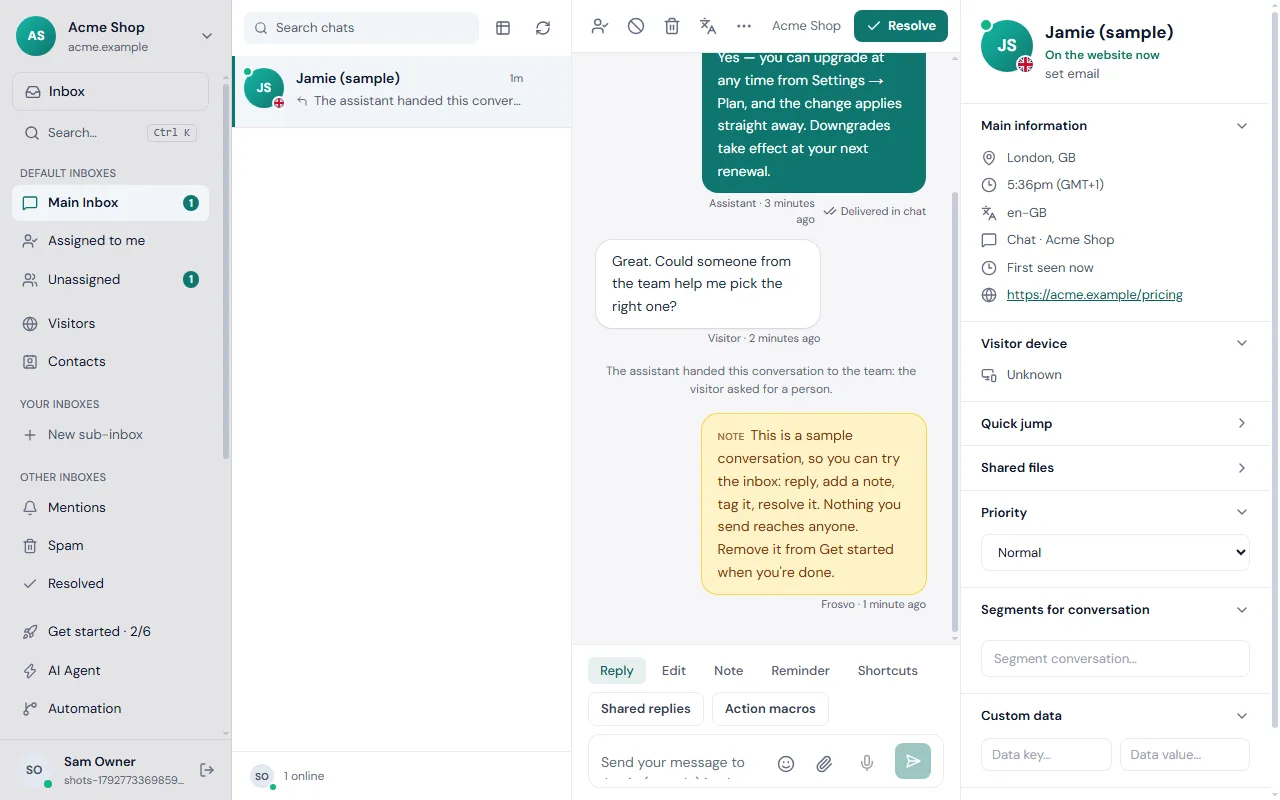
One inbox for every channel
Customers write wherever they are, and every message arrives in the same list: website chat, your support email address, WhatsApp, Messenger, Instagram, Telegram, SMS, Viber, LINE, Discord, X, eBay messages and Google Play reviews. Each channel connects to one of your websites, so conversations stay with the right brand.
Your team replies from the same box, whatever the channel. Frosvo sends the reply the way the customer wrote: as a chat message, an email or a text.
Built for a team
Assign a conversation to yourself or a teammate, or let routing rules do it, including round robin among whoever is online. Private notes are seen only by your team, and an @mention pulls a colleague in. If someone else answers while you are typing, Frosvo warns you before your reply goes out, so the customer never gets two answers.
Saved replies and action macros answer common questions in a click, tags and reminders track follow-ups, and keyboard shortcuts let you move through the inbox without the mouse. Mistakes are fixable: you can edit or unsend your own replies.
Know what happened to every reply
Each reply shows its status: sent, delivered in the chat, seen, or sent by email when the visitor had already left. Visitors show a green, orange or red dot for on the website, away, or left. Your team can also read conversations as tickets in a table with priorities and bulk actions.
Chat transcripts can be emailed to your team when a conversation closes, and spam and abusive visitors can be marked or blocked in one click.
Frequently asked questions
What is a shared inbox?
A shared inbox is one place where a team answers customers together. Every conversation from every channel is listed once, can be assigned to a person, and shows who has answered, so nobody is missed and nobody answers twice.
Which channels can I connect?
Website chat, email, WhatsApp, Messenger, Instagram, Telegram, SMS through Twilio, Viber, LINE, Discord, X direct messages, eBay messages and Google Play reviews all arrive in the same inbox. Each connection belongs to one of your websites, and the setup guide for each channel lists the steps.
Can two people answer the same customer by mistake?
Frosvo reduces the risk. If a teammate replies while you are writing, you are warned before your reply goes out, so you can read theirs first. You can also assign a conversation to one person, and routing rules can assign new conversations automatically, so each customer has one owner.
Does it work on my phone?
Yes. The desk works in any phone browser, can be added to your home screen, and sends notifications when a customer writes. The Windows desktop app adds native notifications and an unread badge on a computer. Your status and notification settings apply to each device you use.
Can I see whether the customer read my reply?
Yes. Each of your replies shows its status under the message: Sent, Delivered in chat when the visitor's chat was open, Seen once they have read it, or Sent by email if the visitor had already left. The status updates by itself while you watch the conversation.