Find these under Automation.
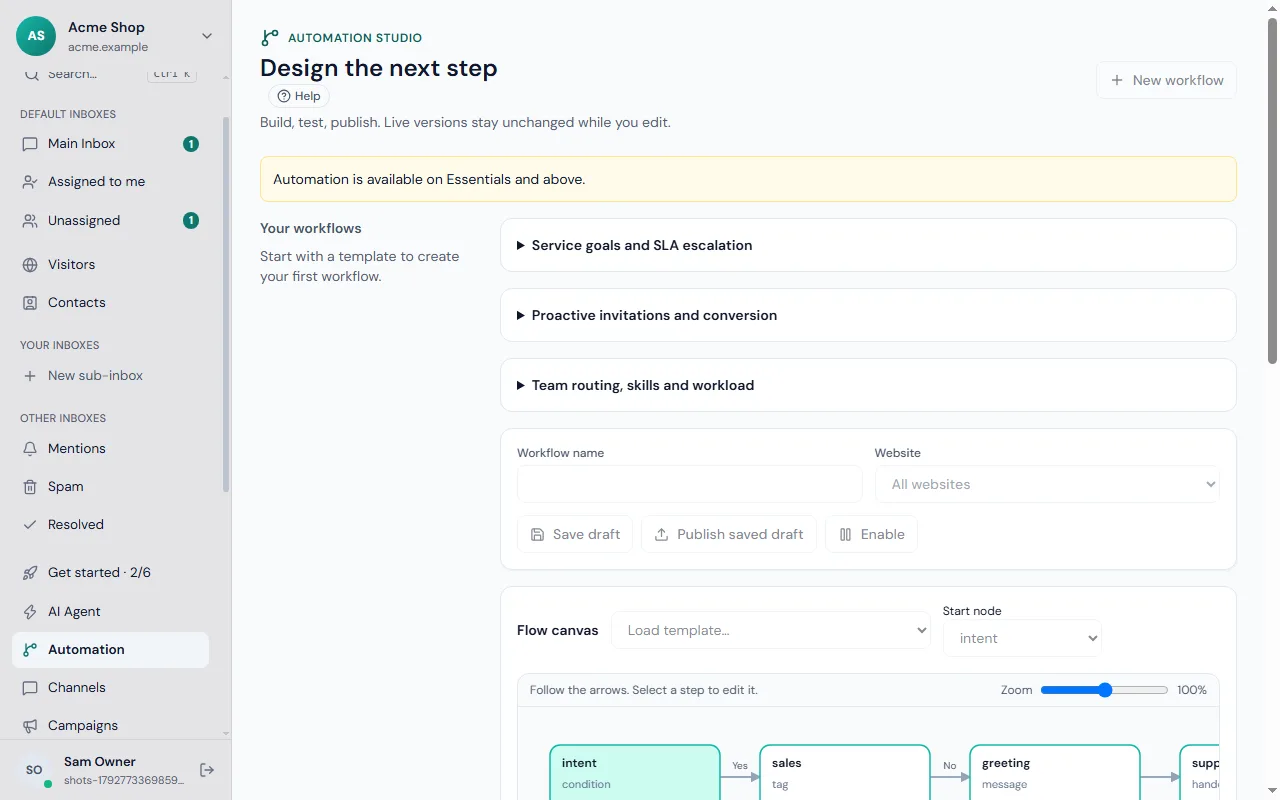
Workflows
When something happens (a new conversation, a message, a tag), check conditions, then act: assign, tag, reply, notify, hand to the assistant or wait. Workflows are drawn as a flow, so you can see what happens next.
Routing
Send conversations to the right people by website, page, language or anything you know about the visitor, and share new conversations fairly with round robin among whoever is online.
Chat triggers
Greet visitors proactively — for example "On the pricing page for 30 seconds → say hello". Choose pages, time on page, country or returning visitors.
Response-time targets (SLA)
Set first-reply and resolution targets. Frosvo warns your team before a target is missed and records misses in Reports.
Office hours
Set your hours per weekday for each website. Outside them visitors see your away message, and can leave their email for a reply.
Where to start
- Set office hours for each website, so visitors know when to expect an answer.
- Add routing so billing questions go to the billing team.
- Set a first-reply target and watch the misses in reports.
- Add one trigger, for example a greeting on the pricing page after thirty seconds.
Related guides
Use saved replies and macros for one-click actions, roles to let a team lead manage automation without being an owner, and the assistant guide for hand-over rules.
Common questions
Do triggers annoy visitors? They can, if used carelessly. Use one greeting per page, wait long enough for people to look around, and stop showing it once someone has chatted.
Can the assistant be part of a workflow? Yes. A workflow can hand a conversation to the assistant or take it back to a person, and the hand-over reason is recorded.
Where do I see what rules did? In the conversation itself, and in reports, which count missed targets and handovers.