Seeing who is on your website at this moment helps you say hello at the right time.
Open the screen
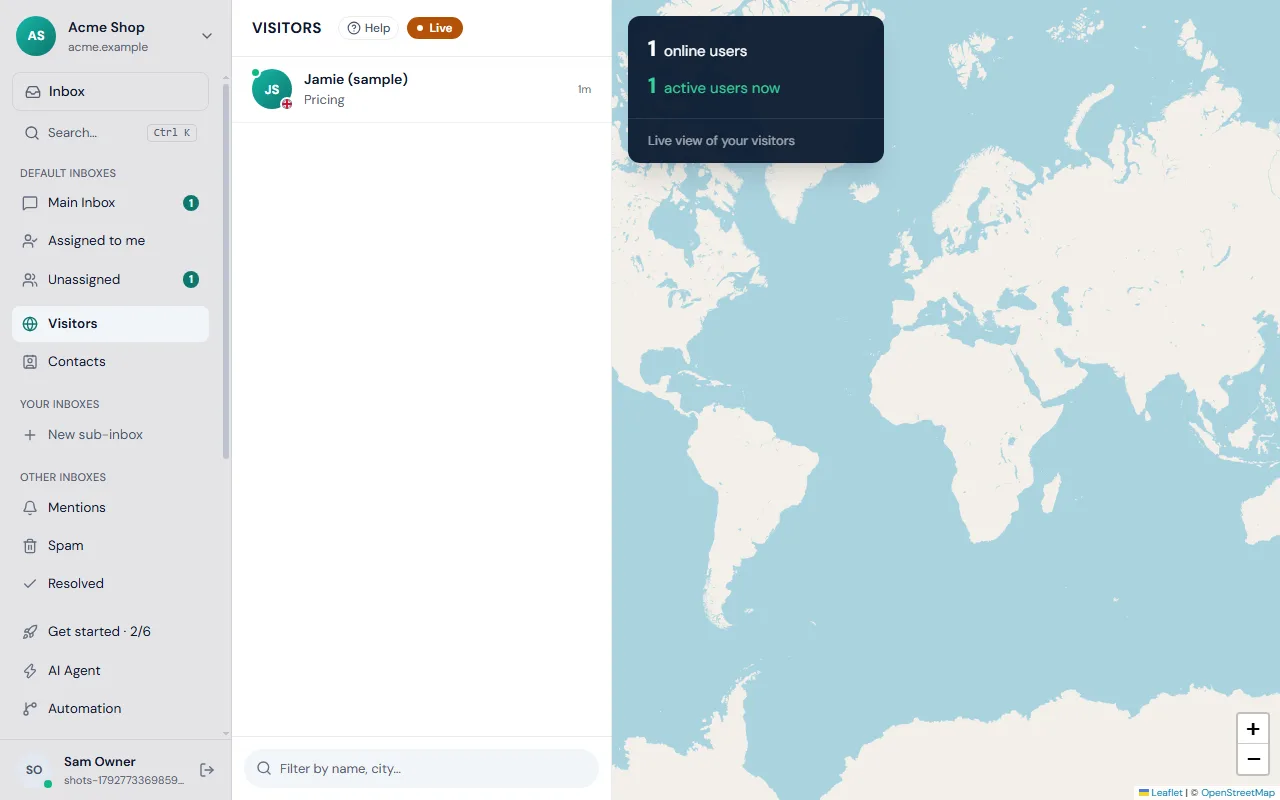
Choose Visitors in the left rail. Open the page from a link such as /desk?visitor=1 if you want to go straight there. The list is on the left and a map of the world is on the right.
The panel at the bottom shows two numbers: online users (everyone not marked as having left) and active users now (people with the page open in front of them).
Read the list
Each row shows the name, if you know it, or a label for an anonymous visitor, with the city and country and the page they are on. A coloured dot on the avatar shows their status: green on the site, orange away from it, red left. See online, away and left for the exact meaning.
Visitors who are also customers are marked Client. Use the box above the list to filter by name or city.
Open a visitor
Click a row. You see:
- Where they are on the map.
- Pages browsed, with the title, address and time of every page they opened.
- Open their chat if they already wrote to you, or a box to start a chat if they did not.
Use the website switcher
If you have more than one website, the button at the top of the rail filters Visitors, Contacts and Reports to one site. Frosvo remembers your choice on that device.
New visitor alerts
You can be told when someone arrives. Go to Settings → Notifications and switch on Also tell me when someone arrives on the website. Clicking the alert opens that visitor.
Privacy
Frosvo shows what the visitor's browser sends and the pages they open on your website. Make sure your own privacy notice says that you use live chat, and see security and privacy for retention and deletion settings.
If nobody shows up
Check that the chat is installed on your site and that you are looking at the right website in the switcher. Visit your own page in another browser to test.