Frosvo sends things in the background: reply emails, chat transcripts, campaigns, channel messages and webhooks. Queue health shows whether that work is flowing.
Open it
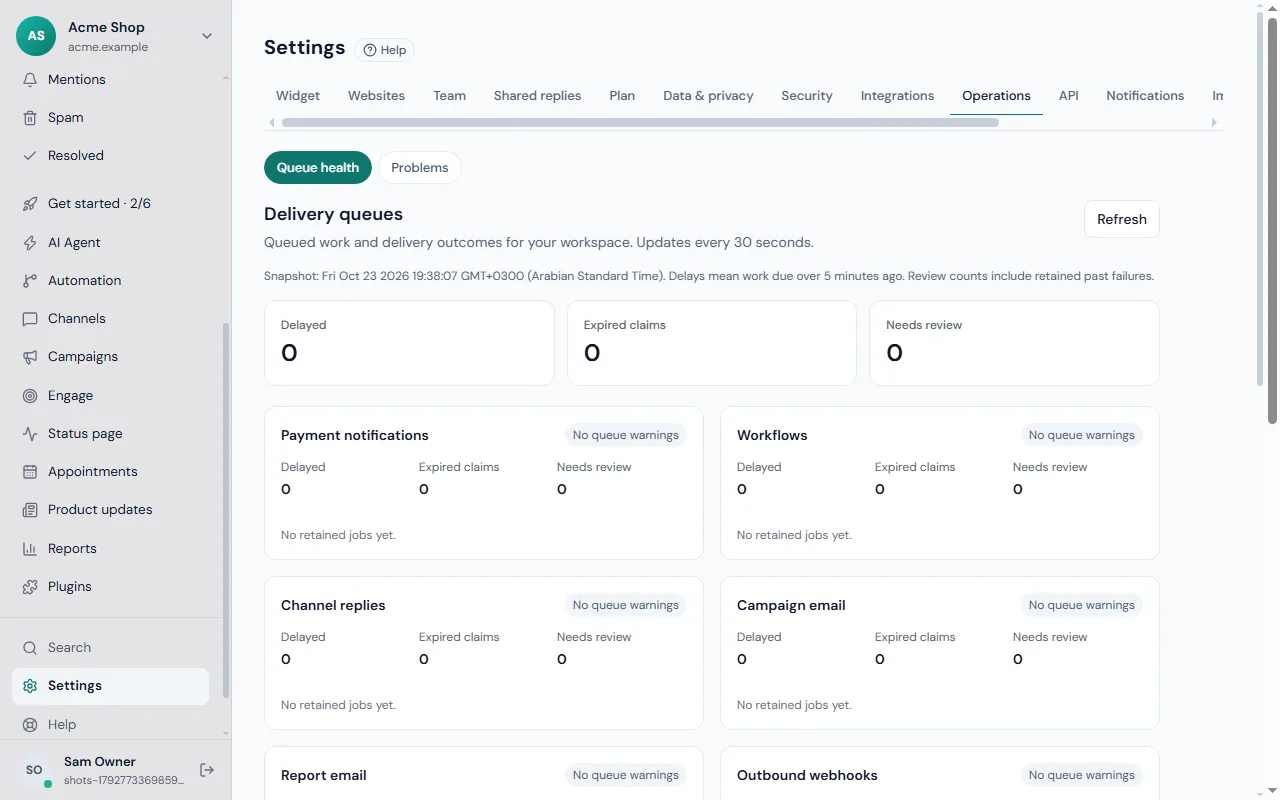
Go to Settings → Operations. The card is titled Delivery queues with the note "Queued work and delivery outcomes for your workspace. Updates every 30 seconds." Click Refresh to update it now.
What you see
A snapshot time, then counts for each queue. The counts that matter most:
- Needs attention: the headline. If everything is fine it reads No queue warnings.
- Delayed: work that was due more than a few minutes ago and has not gone out yet. The snapshot line tells you the exact number of minutes.
- Expired claims: a background job picked something up and then stopped before finishing, so it is waiting to be tried again.
- Needs review: items where Frosvo cannot be sure what happened. They are held so nothing is sent twice.
- Retained records: past failures kept for review. Their count is included, so a number above zero does not always mean something is wrong right now.
What to do about each
- Delayed. Wait a minute and refresh. If it persists, check your mail server settings or the channel concerned.
- Needs review. Do not simply resend. Ask the recipient, or check your provider, whether the message arrived. Then retry from the place that owns it.
- Expired claims. These normally clear by themselves. If they keep coming back, look at the Problems page.
Where to investigate
Use Channels for messages on WhatsApp, Telegram and others, Campaigns for email campaigns, the report email history for scheduled reports, and the webhook delivery history for webhooks. Payment notification review needs a platform administrator in Billing.
Good habits
- Look at the page when a customer says they never got a reply.
- Remember that a mail server accepting a message is not the same as the inbox showing it. Mail can still land in spam; see SPF, DKIM and DMARC.
- Combine it with alerts: when delivery fails repeatedly, owners are emailed as described in problems and alerts.
More fixes are in the troubleshooting guide and the channels guide.