Make the desk comfortable for the person using it.
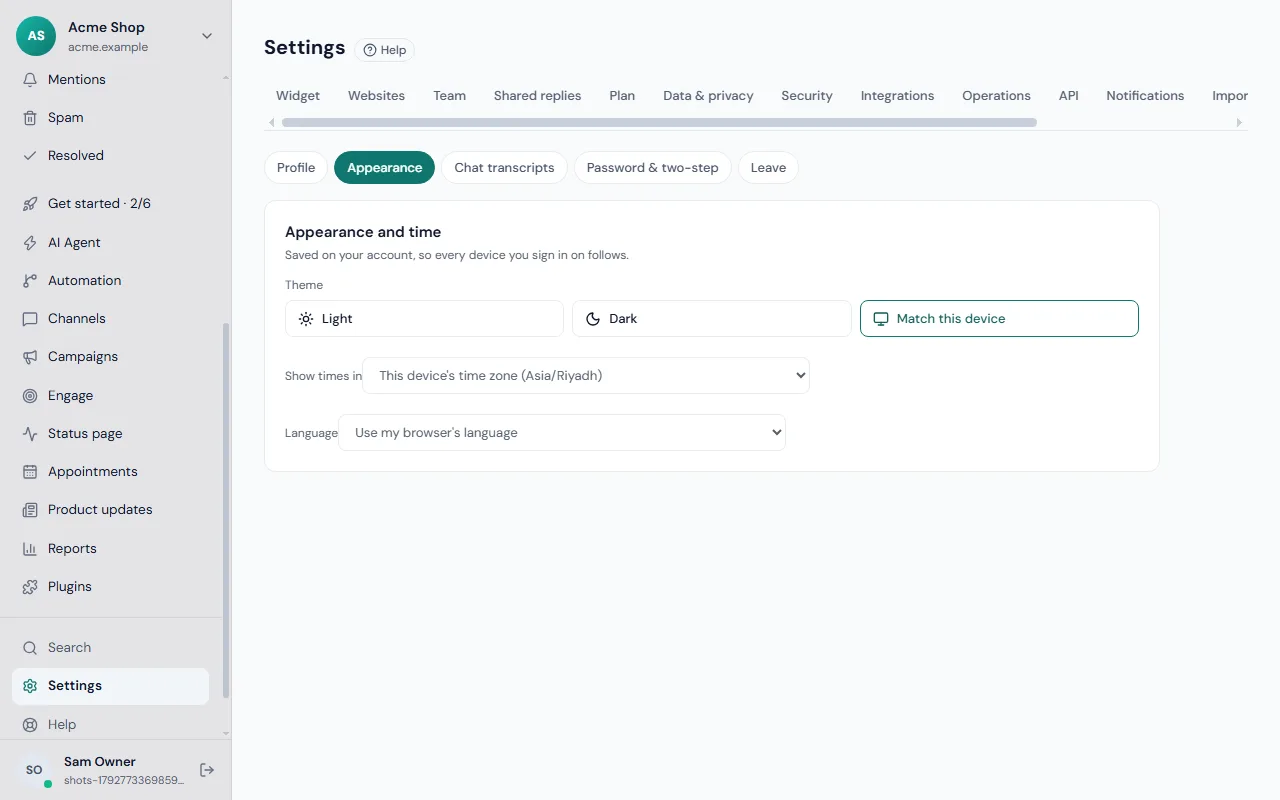
Where to change it
Go to Settings → Account and open Appearance and time. The text under the title says "Saved on your account, so every device you sign in on follows." Change it once and your laptop, phone and the desktop app all match.
Theme
Under Theme choose one of three:
- System: the desk follows your device and switches with it.
- Light
- Dark
The choice is also remembered in the browser so the page does not flash the wrong colours as it loads.
Language
Under Language choose your language or Use my browser's language. The desk is available in English, Spanish, French, German, Portuguese, Italian, Dutch, Turkish, Chinese, Arabic and Urdu. Arabic and Urdu switch the whole layout to read from right to left.
This is only your desk. The chat your visitors see has its own language handling, described in the widget settings.
Time zone
Under Show times in choose either This device's time zone (shown with the zone's name) or a fixed zone from the list. Every date and time in the desk, including conversation times and reports, follows it.
Pick a fixed zone if you work from several places but want times to match your team's base. See also reports.
For a whole team
Each person chooses their own. A team in several countries can each read the desk in their own language and zone, while customers still get consistent messages. To agree a shared style for replies, use shared replies.
New to Frosvo? The getting started guide walks through the first steps, and the settings overview shows where else to look.
If something looks wrong
If the desk shows the wrong language after you change it, reload the page once. If times seem an hour out, check whether your device's time zone is set correctly, because This device's time zone follows whatever the device says. On a shared computer, sign out when you finish so the next person sees their own settings.